Listings & SEO· Thomas Cuccittini 6 min read
How to Refresh an Old Listing: Seven Steps That Keep Its History
A listing that has sat unchanged for a year is worth a look. Seven steps to update the facts, photos, title, description and tags, and a way to tell whether the change helped.
To refresh an old listing, edit it in place and keep its history, instead of deleting it and starting again. A listing that has sat unchanged for a year may carry a price, a photo or a promise that is no longer true, and it may be written for the way you described the item when you started. This guide gives seven steps for updating one, the facts about editing and renewing on Etsy and Shopify that bear on it, and a way to tell afterwards whether the change helped. It makes no promise that a refresh brings sales, because nothing can.
See what is holding your listings back
How Cashowa works for sellersEdit in place, and why
Etsy's help page on fees and listing multiple quantities says there is no fee for editing a listing. Etsy's page on renewing listings says a renewed listing keeps its view count, its favorites and its web address, and gets a new listing date and a new four-month term for $0.20. A listing you delete and recreate keeps none of that. On Shopify, the product details page says not to edit a product's URL handle too often, or the product might not display in search results, so leave the handle alone unless you have a reason.
So the rule is simple: change the words, the photos and the details, and leave the address and the history where they are.
The seven steps to refresh an old listing
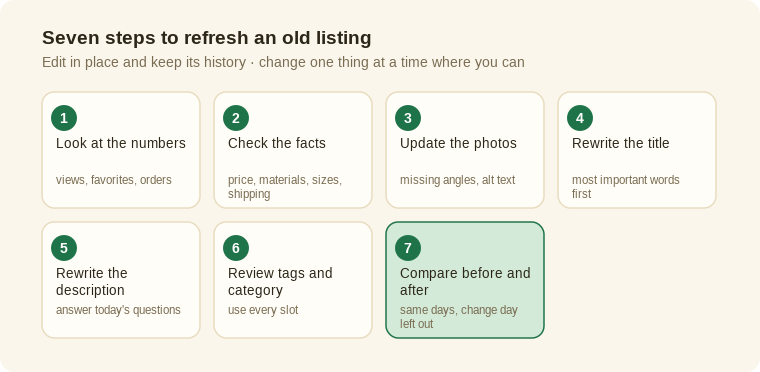
- Look at the numbers first. Open the listing's views, favorites and orders for the last few months. A listing that still sells may need a small change, and one that gets views and no orders needs a different one from one that gets no views.
- Check the facts. Price, materials, sizes, colors, processing time and what is in the box. Anything that has changed since you wrote it is the first fix.
- Update the photos. Add the shots a buyer cannot find now, and replace any that no longer match the item. Our guide to product photography with your phone lists the shots a buyer needs, and each photo should carry alt text, as our guide to alt text explains.
- Rewrite the title. Put what the item is first, then the words a buyer would use, keeping every keyword you already had. Product title length by platform sets out how much room each platform gives you.
- Rewrite the description. Answer the questions buyers have asked you since you wrote it. The guide to writing a product description has a template.
- Review the tags, category and item specifics. Use every tag slot you have, and check that the category is still the best fit. See product tags and categories.
- Compare the days before and after. Leave it alone for a while, then look at the same listing over the same number of days.
Change one thing at a time where you can
If you change the title, the photos, the description and the tags on the same day, and sales rise or fall, you cannot tell which change did it. Where a listing is important to you, change one field, wait, and then change the next. Our guide to whether a listing change worked explains a fair comparison: the same number of days before and after, the change day left out, and the rest of your shop as a yardstick, because a whole shop can move for reasons that have nothing to do with one listing.
Which listings to start with
You do not have to refresh everything. A sensible order:
- Listings that sell but have thin fields. A small change to a listing with a track record has the most to gain and the least to lose.
- Listings with views and no orders. The photos, the price or the description may be what stops a buyer.
- Listings you have not changed in a year or more. They are the likeliest to be out of date.
- Seasonal listings, a month or two before the season.
Leave alone a listing that is selling well and that you have no reason to doubt.
What a refresh should not change
Do not add a fact you cannot stand behind, and do not drop a keyword that was working, because the old wording may be what a buyer found. A refresh adds to a listing. It does not rewrite the seller's own voice.
Where Cashowa fits
Cashowa's store health check lists every active listing on Etsy, Shopify and WooCommerce that has not been changed in over 365 days, a rule of thumb of Cashowa's own, so you can see which to start with. eBay does not give a time of last change, so Cashowa does not run that check there. Where the platform lets an app change a field, Cashowa can draft a better title, description or tags as a suggestion: it keeps the words you used, adds no fact you did not give it, and waits for your approval. After a change, Did it work? compares the 14 days before and after using the sales reports you upload, leaves the change day out, and sets the product's movement against the rest of your shop. The glossary has entries on a stale listing and on listing renewal, and how Cashowa works for sellers says what it reads and keeps.
Frequently asked questions
How often should I update a listing?
There is no set interval. A year without a change is a reasonable time to look at one, and Cashowa's health check uses over 365 days as its rule of thumb. Look sooner if a price, a material or a shipping time changes.
Should I delete an old listing and make a new one?
Editing in place keeps the listing's history. On Etsy, a renewed listing keeps its view count, favorites and web address, and editing a listing costs nothing. Recreating a listing starts from zero.
Does renewing a listing on Etsy help it sell?
Etsy's page says a renewal gives a listing a new listing date and a new four-month term and costs $0.20. It does not say that a renewal changes where the listing shows in search, and no one outside Etsy can say how much a signal counts.
How do I know whether the refresh worked?
Compare the same listing over the same number of days before and after, leave out the change day, and look at how the rest of your shop moved over the same days.
The term 'Etsy' is a trademark of Etsy, Inc. This Application uses Etsy's API, but is not endorsed or certified by Etsy. eBay, Shopify and WooCommerce are trademarks of their respective owners. Cashowa is independent and is not endorsed or certified by any of them.