Listings & SEO· Kamal F 6 min read
How to Photograph Products With Your Phone: The Shots a Buyer Needs
The shots a buyer needs from a phone, what Etsy and eBay say their photos must and must not contain, and how to clean up a background without changing the product.
Product photography with a phone comes down to a short list of shots, plain light and a clear background. A buyer cannot hold the item, so the photos have to answer what they would ask in a shop: what it looks like whole, how big it is, what it looks like close up, and whether there is anything wrong with it. This guide gives the shots to take, what Etsy and eBay say about photos and editing, and how to clean up a background without changing the product.
Clean up a product photo, or find out what it is missing
See what Cashowa can doWhat a buyer cannot tell from a photo
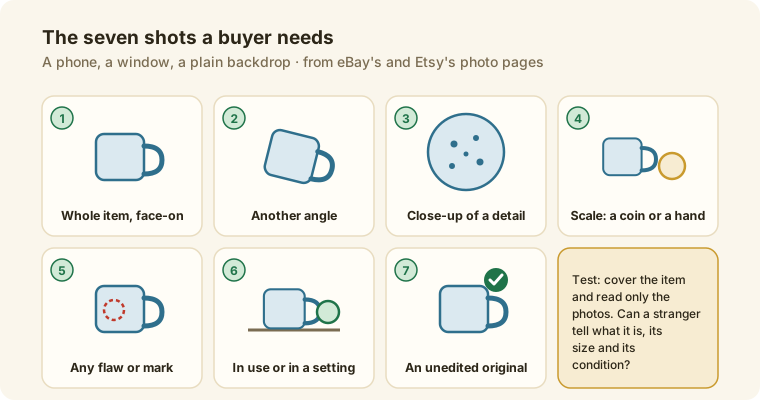
A photo shows color, shape and a bit of texture. It does not show size unless something sits beside the item, how the item looks from behind, how it feels, or any flaw you did not photograph. Each shot below answers one of those questions. The test for a set of photos is to cover the item and read only the photos: could a stranger say what it is, how big it is and what condition it is in?
The shots to take for product photography
eBay's help page on adding pictures and Etsy's pages on photos give the basis for this list:
- The whole item, face-on. eBay says the main photo should show the whole item face-on, because it appears in search results.
- Another angle or two. Back, side or top. eBay says to capture several angles.
- A close-up of the detail. The glaze, the stitching, the engraving, the texture.
- Scale. eBay suggests a coin or a ruler beside the item if its size is not clear. A hand holding it also works.
- Any flaw, mark or imperfection. eBay says to show close-ups of flaws or scratches, which builds buyer confidence.
- The item in use or in a setting. It helps a buyer picture it, and it comes after the plain photos.
- An unedited original. Etsy says most listings need at least one unedited photo of the actual item against a real background.
Light, background and the phone
eBay's page recommends an uncluttered space against a neutral backdrop. White is generally best, and it says a darker background may suit shiny items such as jewelry. It advises avoiding flash and overhead lighting to reduce glare. In practice that means a window with soft daylight, a plain sheet or board behind the item, and the phone held still and level.
What Etsy and eBay say about size and format
Etsy. Its page on image requirements recommends photos at least 2000 pixels wide and high, and says the first photo should be at least 635 pixels to avoid showing up lower in searches. It asks for a first photo that is landscape or square, with later photos matching its shape, and it says to leave enough border around the product so the thumbnail can be cropped to square, portrait and landscape without losing part of it. Accepted formats are .jpg, .gif, .png, .svg and .heic, transparent .png files are not supported and show black, and files over 1 MB may fail to upload on a slow connection. The listing form takes up to 20 photos.
eBay. You can add up to 24 pictures. The minimum is 500 x 500 pixels and eBay recommends about 1600 x 1600, with a 1:1 or 16:9 aspect ratio looking best. Files can be up to 12 MB. Its picture policy requires at least one photo of 500 pixels on the longest side, and it does not allow added borders, text, artwork, promotional material or watermarks, or stock photos for used or damaged items.
What counts as an edit
Etsy's page on how its image requirements apply says the unedited photo can be cropped, resized or converted, but its lighting and content cannot be changed. The other photos in the listing can be edited, including with AI, to adjust lighting or color, crop or resize, or change the background. Etsy says edits cannot hide damage or make the item look different from what the buyer receives, and its image requirements page recommends noting AI-based edits in the listing description.
eBay's help page says you can crop, rotate, edit the background and adjust brightness and contrast in its Edit photo screen, and it says you cannot add graphics such as badges, logos, copyright notices or watermarks, because they can affect search placement.
Mistakes worth checking for
- A photo that shows a different color from the item. Etsy says images must show color accurately.
- No unedited photo on Etsy. Most listings need one.
- Added text or a border on eBay. The picture policy does not allow them.
- A stock photo of a used item. eBay prohibits it.
- A flaw left out. eBay says to show them.
Where Cashowa fits
Cashowa's Photos page cleans up a photo you add without changing the product. You choose a plain background (white, light grey or cream, or keep your own), a square frame that pads the photo and never crops it, or the photo's own shape, a soft shadow, and a brighten and balance step. The product's own pixels are kept: nothing is redrawn and nothing is added. You download the result and add it to your listing yourself, and it changes nothing in your store. Its advice is to keep your original photo first on Etsy and add the edited one after it.
Photos can also place the product in a generated setting, such as a wooden table or a bright shelf, and it labels that result as AI-assisted. The photo check takes one photo and says what it sees, what a buyer still could not tell from it, and three photos to take. It says nothing about the product's quality and nothing about any platform. Photos is part of the Growth and Scale plans: see pricing. What Cashowa can do shows each screen.
Frequently asked questions
How many photos should a product listing have?
Etsy's listing form takes up to 20 photos and eBay allows up to 24. Neither platform sets a number you must reach, but eBay recommends several angles. The shot list above covers what a buyer asks.
What size should product photos be?
Etsy recommends at least 2000 pixels wide and high, with the first photo at least 635 pixels. eBay's minimum is 500 x 500 pixels, and it recommends about 1600 x 1600.
Do I need a white background?
eBay says white is generally best, and that a darker background may suit shiny items. Etsy asks for at least one unedited photo of the actual item against a real background, and it allows the other photos to have a changed background.
Can I edit product photos with AI on Etsy?
Etsy's page says the other photos in a listing can be edited, including with AI, to adjust lighting or color, crop or resize, or change the background, as long as the edit does not hide damage or make the item look different. The unedited photo cannot have its lighting or content changed.
The term 'Etsy' is a trademark of Etsy, Inc. This Application uses Etsy's API, but is not endorsed or certified by Etsy. eBay is a trademark of its owner. Cashowa is independent and is not endorsed or certified by it.