Platform guides· Jane Wilson 8 min read
How to Bulk Edit Listings on Etsy, eBay, Shopify and WooCommerce
What each platform's bulk editor changes, the mistakes it makes easy, and a safe process for changing many listings: a copy first, one change, a few listings, then the rest.
To bulk edit listings, select the listings in your platform's list view, choose the edit action, change the field and save. Etsy, eBay, Shopify and WooCommerce each have their own tool, with their own list of fields and their own warnings. This guide sets them side by side, then gives a process that makes a mistake cheap to fix: a copy first, one change, a few listings, a check, then the rest.
Review a page of changes, not a hundred
See Fix all in CashowaHow to bulk edit listings on each platform
| Platform | Where | What the platform's page says it changes | Worth knowing |
|---|---|---|---|
| Etsy | Shop Manager, Listings, tick listings, Editing options | Titles, tags, descriptions, prices, custom options, production partners, renewal options, processing profile and shipping profiles | New listings cannot be bulk uploaded, but a listing can be copied |
| eBay | Seller Hub, Active listings, Edit | The Bulk Listing Tool handles up to 2,000 listings: pricing, Volume Pricing, Promoted Listings and scheduling | A second route is uploading an edit template through Seller Hub Reports |
| Shopify | Products, tick products, Bulk edit | A table of the selected products, with Columns choosing the properties; price, SKU and compare-at price are its examples | CSV import for larger volumes |
| WooCommerce | Products, All Products, Bulk actions, Bulk edit | Categories, status, tags, price, sale price, tax, weight, size, shipping class, visibility, featured and stock fields | Title and description are not on the list the page gives |
Etsy. Etsy's help page on editing multiple listings, read on November 16, 2026, says to tick the listings on the Listings page in Shop Manager, open the editing options, choose an action and confirm. It lists the fields you can edit in bulk and says new listings cannot be bulk uploaded, though you can copy a listing to save time. The page does not state a maximum number of listings.
eBay. eBay's page on bulk listing tools says the Bulk Listing Tool manages up to 2,000 listings. From the Active listings section of Seller Hub, you tick the Edit boxes beside two or more listings or use Select all, optionally search and filter by category, format or status, then choose Edit. You can set a price for several listings at once, or raise or lower prices across listings by a total percentage or dollar amount. eBay's Seller Hub Reports page describes a second route, uploads: download an edit template, add your changes, and upload it as an .xlsx or .csv file, which usually takes less than 15 minutes to process.
Shopify. Shopify's bulk editing page says to select items in Products, Collections, Inventory or Customers and click Bulk edit. Columns adds or removes the properties shown, you click a field to change it, and Save applies the edits. The page says the more you change at one time, the longer it takes, and recommends a CSV import for larger volumes.
WooCommerce. WooCommerce's page on bulk editing products says to select products in Products, All Products, choose Bulk edit from Bulk actions, set the fields you want to change and select Update. A field left at No change keeps its current value. Product title and description are not on the list of fields the page gives. For a spreadsheet route, WooCommerce's CSV importer and exporter updates existing products matched by ID or SKU.
The mistakes a bulk edit makes easy
- A rule applied to everything selected. eBay's page describes price changes by a percentage or a dollar amount across multiple listings. A wrong percentage reaches every listing you ticked.
- Side effects. WooCommerce's page says a bulk change to a regular or sale price clears a product's scheduled sale dates, that bulk price changes apply by default to simple and external products and not to individual variations, and that clearing a category checkbox does not remove a category already assigned. It also says bulk editing applies only to the products selected on the current page.
- A blocked save. Shopify's page says an error such as "Update the invalid values, then save again" usually means a product or variant has an invalid value, often a missing SKU or a metafield validation error, even in a hidden column.
- A spreadsheet round trip. WooCommerce warns that spreadsheet applications can change formatting or character encoding, so review the saved CSV before importing it. Shopify says a UTF-8 CSV is the only file format it imports or exports.
- No undo button. The Etsy, eBay and Shopify pages above describe how to make an edit and do not describe an undo. WooCommerce's page says that if a value is wrong, you edit the affected products again to restore it. Plan on the copy in the next section being your undo.
A safe process for changing many listings
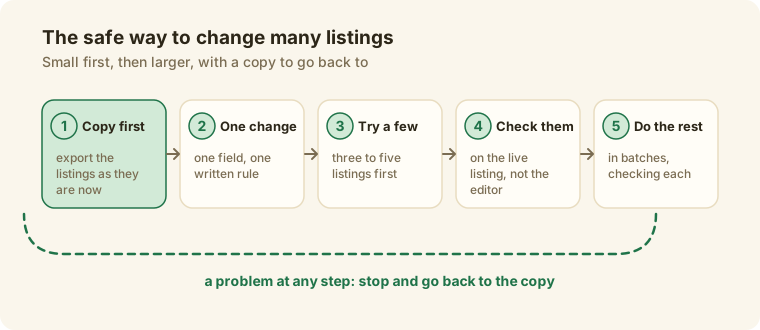
- Write the change down as one rule. One field, one instruction: "add the word handmade to the end of every ceramic title."
- Export a copy first. Etsy's help page on downloading listing information gives the route: Shop Manager, Settings, Options, Download Data and Download CSV. The file covers your active listings with titles, descriptions, prices, quantity, tags, materials, image addresses and SKUs if you added them. Shopify's export products page exports the current page, all products, the products you selected or the results of a search, as a CSV without the images. WooCommerce's exporter lets you choose columns, product types and categories and generates a CSV. On eBay, the Reports tab can download a report with Listings as the source.
- Try it on three to five listings. Choose a few that differ: a short title, a long one, one with variations.
- Check them where a shopper sees them. Open the live listing, not the editor.
- Do the rest in batches, checking one from each batch.
- Keep a log: the date, the field, how many listings and the rule. You will want that date later to see whether the change worked. Did your listing change work? shows how to compare sales before and after.
When one at a time is safer
Some changes are not rules. A description with specific details, a title that needs the product's own keywords, a size or a scent: the right words differ by product, and a bulk edit applies one answer to all of them. The same goes for listings with variations (WooCommerce's page says a bulk price change does not reach individual variations by default) and for anything you could not restore from your copy.
Where Cashowa fits
Fix all with Cashowa writes a suggestion for each listing that needs one, three at a time, up to 25 listings per press. Each suggestion lands on the page as its own before-and-after card that waits for you, so you review a page of changes and not a hundred separate ones. Nothing changes in your store until you approve a card, and you can stop a run at any point. When you press Apply to my store on an approved card, Cashowa reads the live listing, writes the change, reads it back to check that it landed, and keeps an Undo for it as long as nothing has touched the field since. If you edited the listing yourself after the suggestion was written, Cashowa stops and your edit wins. How to check an AI-written listing gives the seven checks to run on each card.
What Cashowa changes depends on the platform: titles, descriptions and tags on Etsy, titles on eBay, titles, descriptions, tags and photo alt text on Shopify, and titles, descriptions, short descriptions, tags and photo alt text on WooCommerce. Prices, stock, shipping and variations stay yours to change on the platform. What Cashowa can do shows the Priority fixes screen. For more on listing in several places, see how to sell on multiple marketplaces and how to create an Etsy listing.
Frequently asked questions
How many listings can I bulk edit at once?
eBay's page says the Bulk Listing Tool manages up to 2,000 listings. Etsy's page does not state a maximum. WooCommerce edits only the products selected on the current page, and Shopify says larger changes take longer and points to CSV import for large volumes. Cashowa's Fix all writes up to 25 suggestions per press.
Can I undo a bulk edit?
The platform pages describe making the edit, not undoing it, and WooCommerce says to edit the affected products again. That is why the copy comes first. In Cashowa each applied change has its own Undo.
Can I bulk edit titles?
On Etsy, yes: titles are on its list. WooCommerce's bulk editor does not list titles, so use the CSV importer to update existing products. Shopify's page shows price, SKU and compare-at price as examples and lets you choose columns, so open the editor to see what your store offers. eBay's page describes pricing, Volume Pricing, Promoted Listings and scheduling, with uploads for other fields.
Will changing many titles at once hurt my sales?
The marketplaces do not publish how a change to your titles affects search, so the honest answer is to measure it. Change a few, keep the date, and compare the sales before and after.
Should I use a spreadsheet or the editor?
The editor is quicker for a simple rule on a few listings. A spreadsheet is better when the new value differs for each listing and you want to look at all of them before you commit. Either way, export the copy first.
The term 'Etsy' is a trademark of Etsy, Inc. This Application uses Etsy's API, but is not endorsed or certified by Etsy. eBay, Shopify and WooCommerce are trademarks of their respective owners. Cashowa is independent and is not endorsed or certified by any of them.