Store health· Thomas Cuccittini 6 min read
Google's AI Overview Is Wrong About Your Business: How to Fix It
What Google says about AI Overviews, why one can describe your business wrongly, how to report it, and how to fix the pages it reads, with the limits of each step.
A Google AI Overview is the summary that appears above the links on some searches, and it can describe your business wrongly: a product you no longer sell, an address you left, a shop that has closed. You cannot edit it, and Google says it cannot be turned off, but you can report it and you can fix the pages it reads. This guide sets out what Google's own pages say about AI Overviews, a sequence of steps for correcting one, and what each step can and cannot do. Nothing here can promise that an Overview changes, or how fast.
See what an AI assistant says about your business
Try the AI visibility checkerWhat Google says about an AI Overview
Google's help page on AI Overviews says it shows key information and links to dig deeper when Google's systems decide that generative AI can be especially helpful. It also says the plain thing: AI Overviews can and will make mistakes, and you should check important information in more than one place. It says the features cannot be turned off, and that the Web filter after a search shows only text-based links without them.
Google's Search Central page on AI features and your website says how a page can be shown as a supporting link. It must be indexed and eligible to be shown in Search with a snippet. The page says there are no additional technical requirements, and that you do not need special files, AI text files, markup or schema. It also says indexing and serving are not guaranteed, and that AI Overviews often do not appear at all. Both AI Overviews and AI Mode may run a batch of related searches, which Google calls query fan-out, and so show a wider set of links.
So there is no trick. What is in your hands is the information the answer is built from.
Where a wrong answer comes from
An assistant builds an answer from what it finds on the web. An old page on your own site, a directory that was never updated, a review site, a marketplace shop page that still says what it said two years ago: any of these can be the source. The AI visibility checker's own page says the same about assistants in general, that if the places an assistant looks do not mention you, or your site does not say plainly what you sell and where, there is little for it to use.
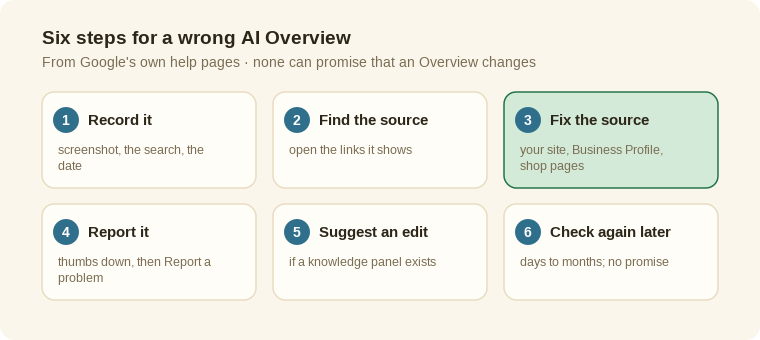
Six steps to correct an AI Overview
- Record it. Save a screenshot, the exact search, and the date. Answers vary from one search and one day to the next.
- Find the source. Open the links the Overview shows and the pages that rank for your name, and look for where the wrong fact appears.
- Fix the source. Correct your own site first, in plain words that say what you sell, where and for whom. Then your Business Profile and your Merchant Center information if you have them, since Google's page says to keep them current, and then your shop pages on Etsy, eBay or Shopify. For another site, ask its owner for a correction.
- Report the Overview. Under the Overview, choose the thumbs down, then Report a problem, pick the category that fits, add details and submit. The three-dot menu at the top right of an overview also has feedback. Google's page says the feedback includes your latest search and its results, and it does not promise a reply.
- If you have a knowledge panel, suggest an edit. Google's page on feedback about content about you says to verify your identity, sign in, search the name, choose Suggest edits, explain the error and add public pages that support it. It says Google reviews feedback from verified users within a few days, and that it can take longer.
- Check again later. Google's page says that after a change to a preview control, crawling can take anywhere from several days to several months, and it gives no time for other changes. In Search Console, URL Inspection shows what Google sees on a page and lets you request a recrawl.
What does not help, and what you do not need
Google's Search Central page says AI Overviews and AI Mode need no special markup. A new schema type, a file for AI, or repeating your name more often is not needed, and Google does not list any as a requirement. The controls it names, nosnippet, data-nosnippet, max-snippet and noindex, limit what Search shows from a page, which is the opposite of what you want when the aim is to be described correctly.
An invented example
A shop moved from selling on Etsy to its own store. Its Overview still says it sells on Etsy and ships from the old city. The owner records the answer, finds that an old directory page and the shop's own About page both still say so, corrects both, reports the Overview with the thumbs down and checks again in a few weeks. The result depends on when Google next reads the pages, and the owner cannot hurry that.
Where Cashowa fits
Cashowa cannot change what Google or any assistant says. What it offers is a way to look. The free AI visibility checker asks one AI assistant, Claude with live web search, one question a customer would ask, and shows whether it names your business, who it names instead and which sources it cited. It is free, needs no sign-up and can be run once a day. It does not read Google's AI Overviews, and ChatGPT, Gemini and Google may answer differently, so it is a snapshot and not a ranking. The full AI visibility check, part of Growth and Scale, asks five questions, scores how often you come up and ranks what to fix. Cashowa's store health check also keeps your own listings complete and current, and your listings are among the pages an assistant may read. Our guide to whether an AI is recommending your competitor goes further, and the glossary has an entry on AI visibility.
Frequently asked questions
Can I turn off Google's AI Overviews?
No. Google's help page says the features cannot be turned off. After a search, the Web filter shows text-based links without features such as AI Overviews.
How do I report a wrong AI Overview?
Use the thumbs down under the Overview, then Report a problem, choose a category, add details and submit. The three-dot menu at the top right of the Overview also has feedback. Google's page does not say that you will get a reply.
Does structured data fix an AI Overview?
Google's Search Central page says AI features need no special markup, files or schema. What matters is that the pages are indexed, eligible to be shown with a snippet, and say accurately what you do.
How long until a correction shows?
Google gives no time for ordinary changes. Its page says that after a change to a preview control, crawling can take anywhere from several days to several months, and for a knowledge panel it says feedback from verified users is reviewed within a few days and can take longer.
The term 'Etsy' is a trademark of Etsy, Inc. This Application uses Etsy's API, but is not endorsed or certified by Etsy. eBay and Shopify are trademarks of their respective owners. Cashowa is independent and is not endorsed or certified by any of them.